
HTTPS stands for Hypertext Transfer Protocol Secure. It is the encrypted version of HTTP. HTTPS is a combination of the Hypertext Transfer Protocol (HTTP) with the Secure Socket Layer (SSL)/Transport Layer Security (TLS) protocol.
TLS is an authentication and security protocol widely implemented in browsers/Web servers.
How Important is HTTP/HTTPS To World Wide Web (WWW)?
HTTP is the entire backbone of the world wide web. The HTTP protocol is vital to the operation of the WWW(World Wide Web), and the encryption layer in HTTPS is necessary when browsers send or retrieve confidential data, such as passwords or banking information.
What is HTTPS?
HTTPS is a short form for Hypertext Transfer Protocol Secure. It is the secure version of HTTP, the primary protocol used to send data among a web browser and a website.
How is HTTPS different from HTTP?
HTTPS is not a separate protocol from HTTP. As we mentioned earlier, HTTPS is the secure version of HTTP. which means HTTPS is simply using TLS/SSL encryption over the HTTP protocol.
How does HTTPS work?
HTTPS utilizes an encryption protocol called Transport Layer Security (TLS) to encrypt communications, which was previously known as Secure Sockets Layer (SSL).
A TSL certificate gives an extra layer of security for sensitive data that we don’t want third-party intruders to obtain like credit/debit card data, other important user data, etc.
What is TLS? How It works
HTTPS needs a TLS certificate to be installed on your server. TLS stands for Transfer Layer Security. You can apply certificates to different protocols, like HTTP (web), SMTP (email), and FTP It secures communications by using an asymmetric public key infrastructure. To encrypt communications between two parties this type of system uses two different keys called Private Key and Public Key.
- The Public Key used for encryption
- The private key is needed for decryption
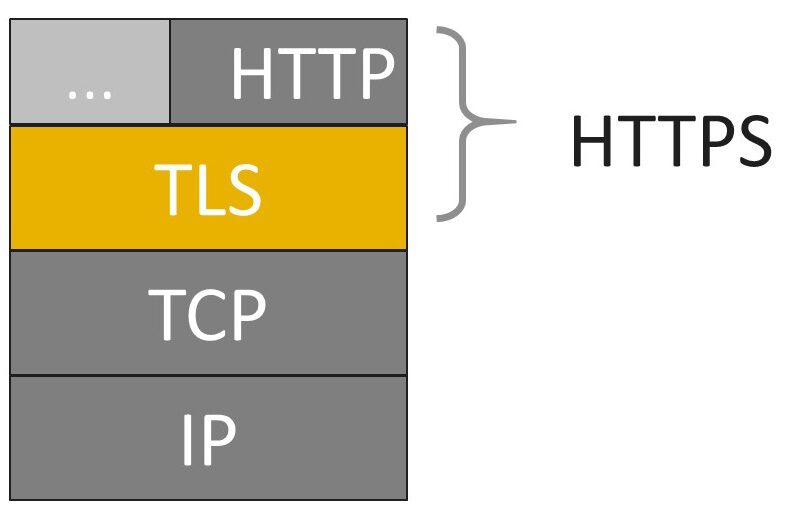
HTTPS STACKS
You already know that TLS by another acronym, SSL (Secure socket layer). SSL was the initial way we secured the Internet. As we developed our standards, we withdrew SSL, but still, the acronym remains the popular term for TLS.
If you look at the above Network Stack diagram, HTTP is at the top, above TLS, which sits above TCP and IP layers.
When HTTP is combined with TLS you get HTTPS This secure version of HTTP.
The HTTPS Handshake
The server answers with its certificate whenever our browser connects to an HTTPS server. The browser checks if the certificate is valid. For the certificate to be valid:
- The owner information needs to match the server name that the user has requested
- It has to be signed by a trusted certification authority.
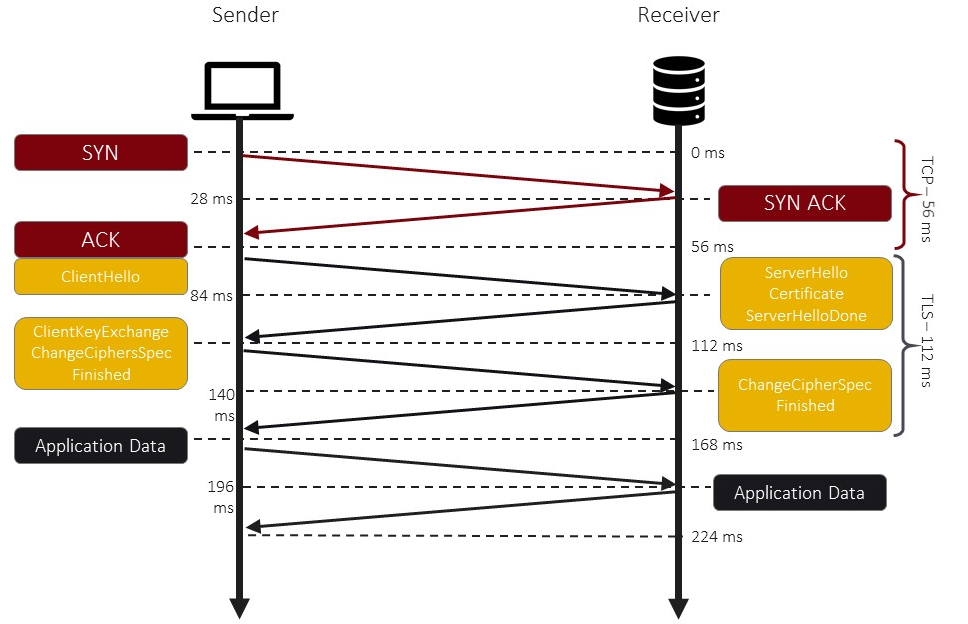
- A series of handshakes take place when HTTP is used. The initial request is sent to the server for verification.
- When the server responds that it is the desired server the client then sends a message.
- At this point the communication becomes encrypted.
- Exchanges encryption keys or ciphers.
- Now, the reader’s communication can proceed. The initial handshakes steps take place within milliseconds.
Difference Between HTTPS vs HTTP
| HTTPS | HTTP |
| Encryption Layer | No encryption layer |
| Data protection | No protection from attackers |
| Ranking Boost with Google | No ranking boosts |
| Protection against Phishing, so can’t replicate easily. | Vulnerable to phishing, because Easy to replicate |
|
Leveraged to gain customer trust |
Cannot leverage website safety |
| Online transaction Industry Compliance | Non-compliance with online payment cards Industry regulation |
| Sometimes it takes time to load only in the initial phases | The faster site to load |
| Needs Testing after conversion to HTTPS | No testing needed |
| Certification and Validation have costs | No certification or validation cost |
| Redirections or relinking required | No post validation redirection needed |
| Google Chrome user friendly | Google Chrome users get a notification regarding the site security issue |
Advantage of using HTTPS
Following are some of the benefits of using HTTPS
- Highly Secure your data-in-transit.
- Protects your website from all kinds of data breaches.
- Builds trust with your website visitors.
- No Security warnings.
- Helps to improve website ranking.
- Helps to boost the revenue per user.
Conclusion
HTTPS should be used on all websites. By this, you are providing your visitors a secure connection and a website they can trust. They will have confidence that communication is with your server and no one is peaking in.